
How Much Should You Pay for Hospitality Software?
You cannot run a modern hotel or restaurant without software. Reservations, room status, check-in, the restaurant bill, card payments, staff schedules, stock and reports all live in a system now. The real question for an owner is no longer whether to pay for hospitality software. It is how much to pay, and how to pay for it.
In 2026, cloud hotel software typically costs about $8 to $25 per room per month for an independent hotel, while enterprise systems such as Oracle OPERA Cloud are quoted individually and can cost $10,000 to $50,000 or more just to implement. Restaurant software runs from $0 to about $350 a month per location, plus 2.3% to 3.5% of every card sale.
Those ranges are wide because every vendor charges differently. In this guide, we break down how hospitality software is priced, look at what the leading hotel and restaurant platforms charge, and explain why the way you pay matters as much as the price itself.
What Hospitality Software Covers
"Hospitality software" is not one product. It is the set of systems that run a property day to day.
In a hotel, the core is the property management system (PMS): reservations, check-in and check-out, room status, housekeeping and guest billing. Around it sit a channel manager that keeps rooms in sync with online booking sites, a booking engine for direct reservations, payments, and tools for staff, procurement, revenue management and guest communication.
In a restaurant, the core is the point-of-sale (POS) system: taking orders, sending them to the kitchen, splitting bills and taking payment. Around it sit kitchen display screens, online ordering, delivery integrations, loyalty, inventory and payroll.
A hotel with a restaurant, bar or room service needs both, and ideally they talk to each other, so that a dinner bill can go straight onto a guest's room.
How Hospitality Software Is Priced
Whether it runs a 20-room guesthouse or a busy restaurant, almost every modern platform charges in the same layers.
1. Upfront Costs
This is what it takes to get started: implementation and setup, data migration from your old system, staff training and, for restaurants especially, hardware such as terminals, handhelds, kitchen screens and printers. It is the only part that is genuinely one-off.
2. The Subscription
You do not buy modern cloud software; you subscribe to it. Hotels usually pay per room per month, often with a monthly minimum. Restaurants usually pay per location per month, sometimes per terminal or per device. That fee pays for hosting, security, updates and, above all, support.
3. Payment Processing
When a guest pays by card, a percentage of the payment plus a small fixed fee goes to the provider and the banks. Restaurants typically pay 2.3% to 3.5% of every card sale; hotel payment platforms commonly charge the card network's cost plus a markup of around 1% to 1.2%.
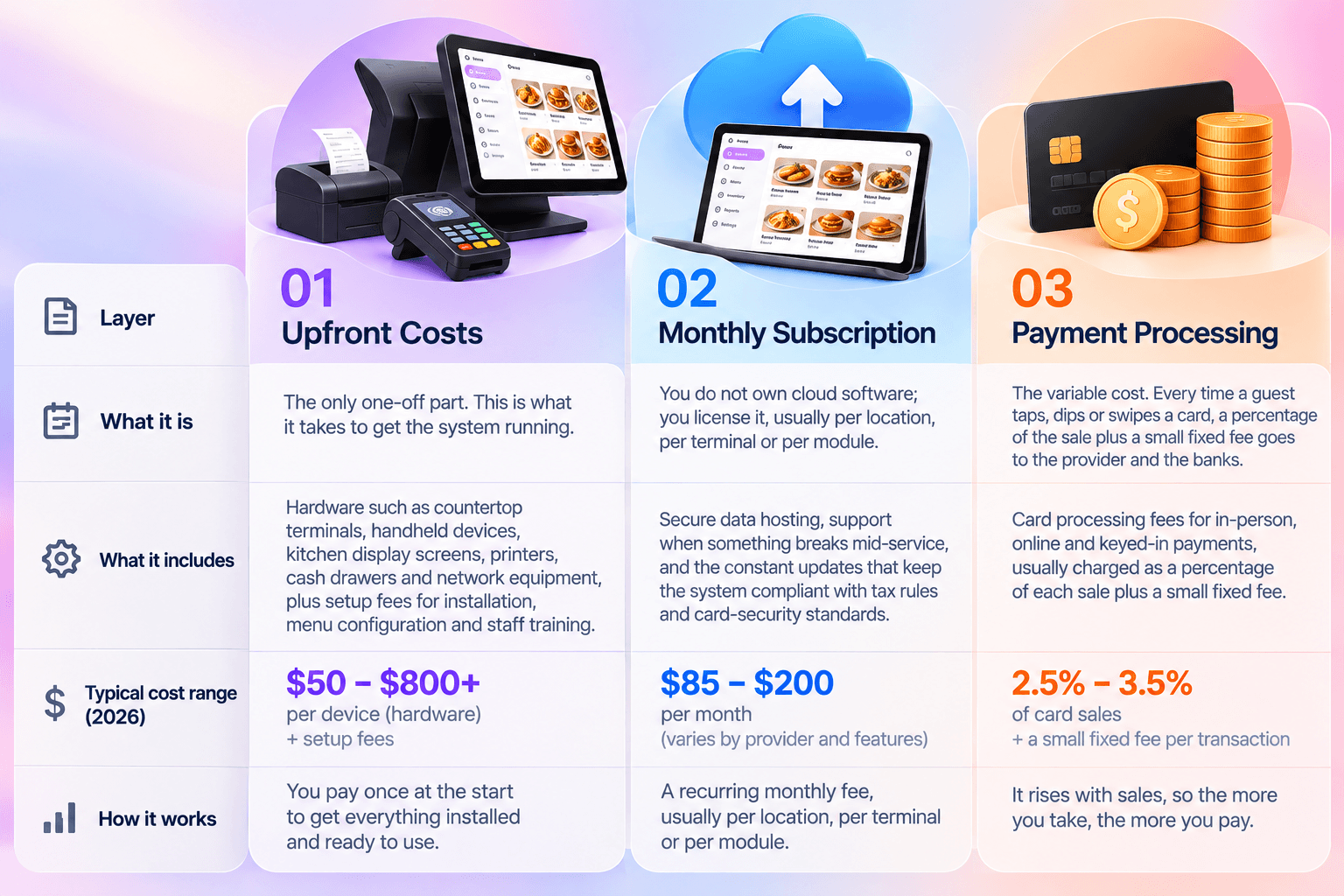
Because it grows with sales, processing is often the highest single cost over a year.
4. Add-ons
The base plan rarely covers everything. Revenue management, guest messaging, online ordering, loyalty, inventory and payroll are often extra modules with their own monthly price.
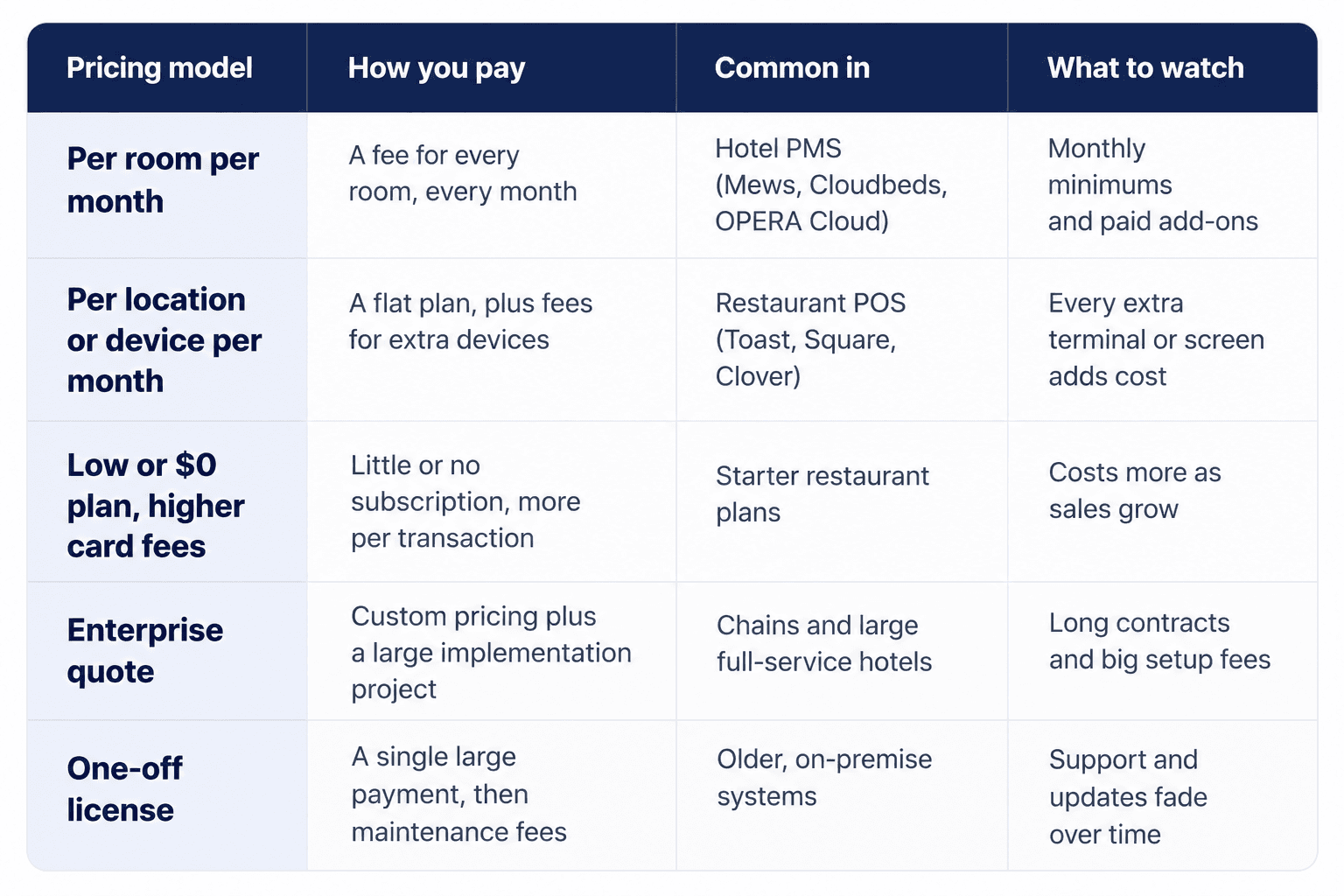
The pricing models differ mainly in how they balance these layers:
Industry Benchmarks
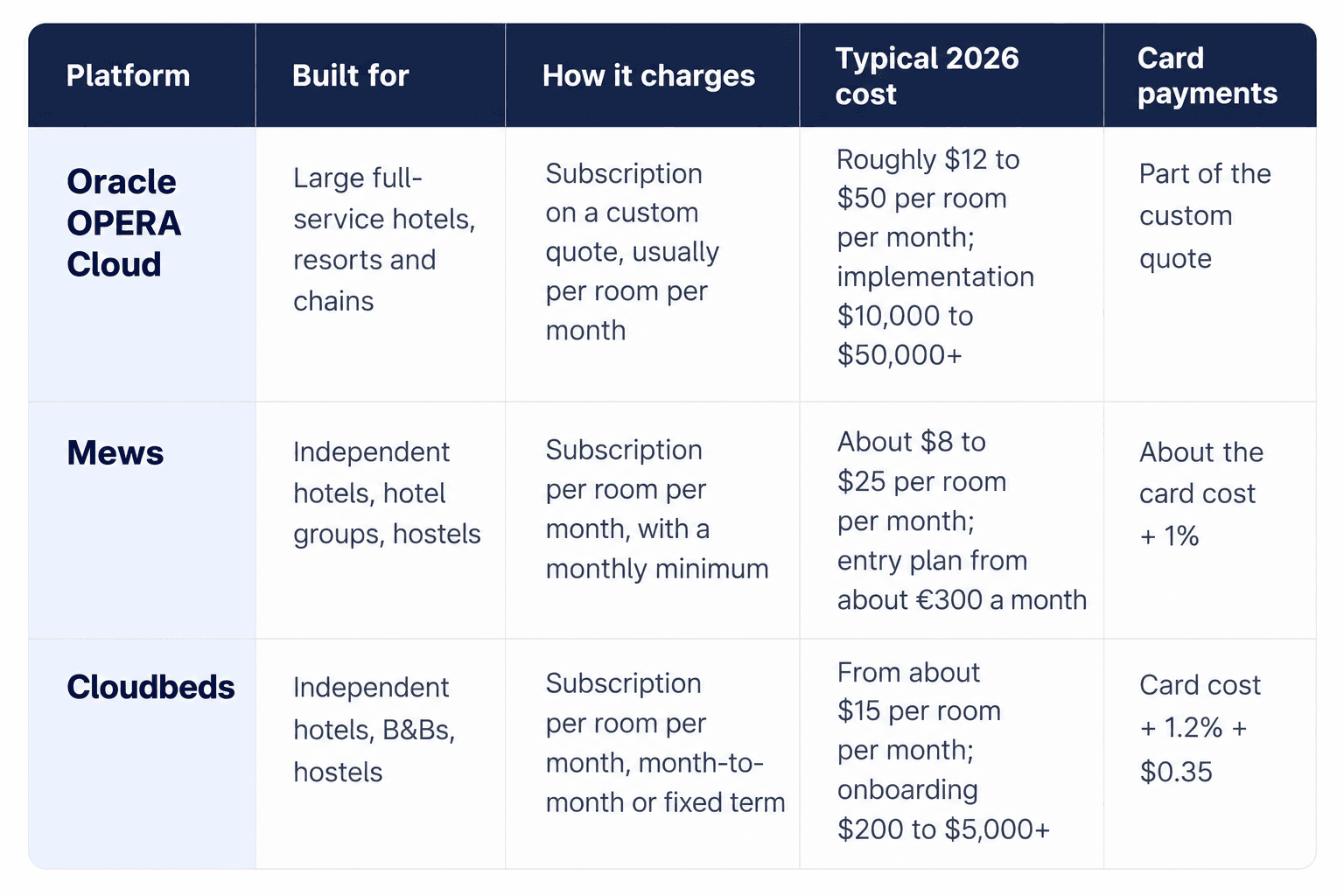
To see what these layers look like in real life, here are three of the leading hotel platforms, Oracle OPERA Cloud, Mews and Cloudbeds, alongside three of the most popular restaurant platforms, Toast, Square for Restaurants and Clover.
Hotels
Restaurants
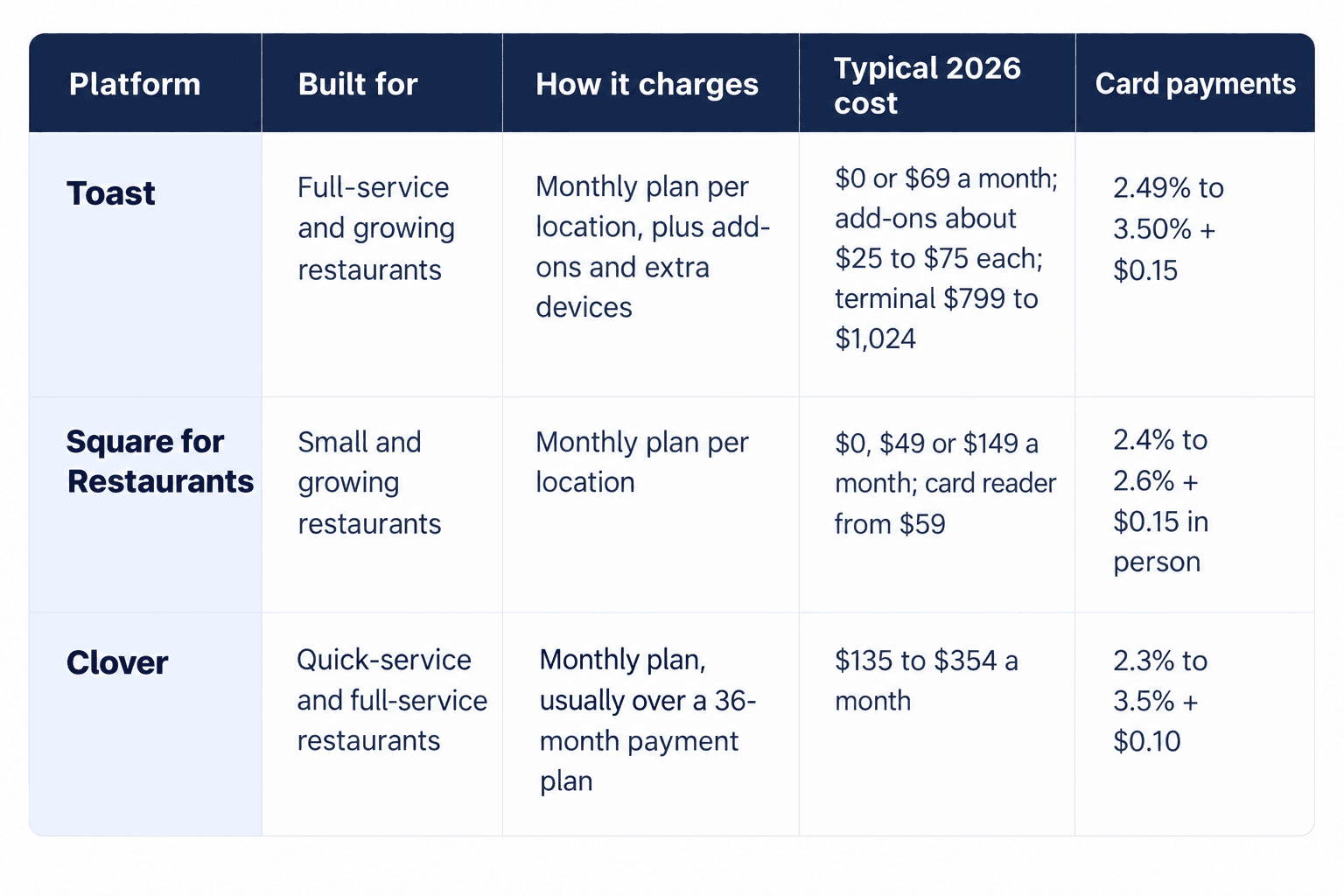
Toast, Square and Clover publish their plan prices. Oracle, Mews and Cloudbeds quote each property individually, so their figures are 2026 industry estimates and will vary with size, modules and contract.
What the Benchmarks Tell Us
1. Every market leader charges a recurring fee.
None of these six platforms sells its software as a single one-off payment. Even Oracle, which once sold OPERA as a perpetual licence with annual support fees, now sells OPERA Cloud as a subscription.
2. Hotels pay by size; restaurants pay by location and sales.
A hotel's bill grows with its room count. A restaurant's bill grows with the number of devices it uses and, through card fees, with every sale it makes.
3. The headline price is never the full price.
Implementation, add-on modules and payment processing can each cost more than the base subscription. Always ask for a full first-year quote.
4. Enterprise and independent systems are different worlds.
OPERA Cloud is built for large hotels and chains; its implementation alone can exceed what a small independent hotel spends on software in several years. Most independent hotels look at cloud platforms priced per room.
5. Card fees add up fastest.
For restaurants especially, processing is usually the highest cost over a year, so a small difference in rate matters more than a small difference in monthly fee.
What It Looks Like in Practice
A 40-room independent hotel on a cloud PMS priced at about $15 per room per month, Cloudbeds' entry-level, pays around $600 a month, or about $7,200 a year, for the core software.
On Mews' estimated range of $8 to $25 per room, the same hotel would pay roughly $320 to $1,000 a month. Onboarding, add-ons such as revenue management, and card fees come on top.
A 100-room full-service hotel on Oracle OPERA Cloud, at an estimated $12 to $50 per room per month, would pay roughly $1,200 to $5,000 a month in subscription, after an implementation project of $10,000 to $50,000 or more.
For large properties, first-year spending on OPERA can reach $75,000 to $250,000.
A small full-service restaurant on Toast's $69 plan, with two terminals, a handheld, a kitchen screen and four common add-ons, taking $40,000 a month in card sales, pays about $1,465 a month: $319 in software and add-ons and $1,146 in card fees.
With $2,974 to $3,672 of hardware, its first year comes to about $20,500 to $21,300, and card fees make up about two-thirds of it.
In every case, the money keeps flowing every month. The software is never "paid off".
Why Hospitality Software Should Never Be a One-Off Payment
Many owners still hope to pay for software once, the way they would buy a generator or a kitchen oven, and never think about it again. It is an understandable wish. It is also the most expensive mistake you can make. However, a vendor who takes a one-off payment has no reason to keep supporting you. Once the money is in their account, every hour they spend fixing your problem, answering your call or updating your system is a cost to them with nothing coming back. Support slows down, updates stop, and when something breaks on a busy weekend, you are on your own.
Software also does not stand still around you:
Security and compliance change constantly.
Card-security standards, tax rules and data-protection requirements are updated every year. A system that cannot update itself becomes a liability.
Your business depends on it being live.
Rates, availability and menus change by the hour and must stay in sync across booking sites, the front desk, the restaurant and online ordering.
Guest expectations keep moving.
Mobile check-in, contactless payment, QR menus and instant messaging were rare a few years ago. Ongoing fees are what pay for those improvements.
This is why every market leader in our benchmarks charges a recurring fee, and why even Oracle moved OPERA from one-off licences to subscriptions.
Pay Monthly or Quarterly and Keep Your Vendor Accountable
The smartest way to pay for hospitality software is a monthly or quarterly subscription. Every payment is a vote of confidence. If the system works, the support is fast, and the updates keep coming, you keep paying. If the quality drops, you can stop. That simple fact keeps the vendor working for you long after the sale. Think of your software as a member of staff who never takes a day off. You would not pay an employee once on their first day and expect them to work for free forever. Pay your software the same way you pay your team: regularly, in return for work that keeps getting done.
How to Budget, and What to Ask
1. Treat the subscription like rent.
It is fixed overhead, the same as power, water or insurance.
2. Build card fees into your prices.
Processing comes straight off your sales, so account for it in your room rates and menu prices.
3. Budget for the first year, not the first month.
Add setup, training, hardware, add-ons and card fees to the subscription before you compare vendors.
4. Keep a replacement fund for hardware.
Handhelds get dropped, and screens get damaged; plan for some replacements every year.
Before You Sign With Any Vendor, Ask:
How is the subscription calculated: per room, per location or per device? Is there a monthly minimum?
Can I pay monthly or quarterly, and what happens if I want to leave?
What do setup, training and data migration cost?
Which features do I need as add-ons, and what do they cost?
What are the card payment fees for in-person, online and international payments?
What support is included, and how fast do you respond when something breaks?
How Quickrooms Approaches It
At Quickrooms, we understand this. That is why we offer our AI hotel operating system on monthly or quarterly subscriptions instead of one-off payments. It keeps us accountable for the quality of the application every single month: if we stop delivering, you can stop paying. And because Quickrooms runs your hotel and your restaurant on one platform, you are not paying for, and juggling, separate systems for rooms and F&B.
You cannot run a hotel or restaurant without software.
Make sure the software you choose has every reason to keep working for you.
Book a demo at quickrooms.co.