

quickroom-logo
Products
Solutions
Resources
Integrations
PricingLogin
Loading...
quickroom-logo🌐 English

contact

  • Blog
  • Support
  • Press Office

legal

  • Privacy Policy
  • Terms and Conditions
  • Cookies Policy

products

  • Hotel Operations
  • Guest Experience
  • Hotel Supply Chain
  • Quickrooms TV
  • ClockIQ
  • Partner Contract
  • Digital Chains
  • Integrations

careers

  • Join Us

Download For Guest

Download on the App Store

Download on the

App Store

Get it on Google Play

Download on the

Google Play

Download For Staff

Download on the App Store

Download on the

App Store

Get it on Google Play

Download on the

Google Play

legal

  • Privacy Policy
  • Terms and Conditions
  • Cookies Policy

careers

  • Join Us

contact

  • Blog
  • Support
  • Press Office

products

  • Hotel Operations
  • Guest Experience
  • Hotel Supply Chain
  • Quickrooms TV
  • ClockIQ
  • Partner Contract
  • Digital Chains
  • Integrations

Download for Guest

Download on the App Store

Download on the

App Store

Get it on Google Play

Download on the

Google Play

Download for Staff

Download on the App Store

Download on the

App Store

Get it on Google Play

Download on the

Google Play

Privacy PolicyStatusLegal
🍪 Cookie Settings
Copyright Quickrooms 2026
🌐 English
Privacy PolicyLegalStatus🍪 Cookie Settings
Copyright Quickrooms 2026
The lounge of a hotel in a Quickrooms chain, in soft lilac light

Digital Chains

Loyalty that works across hotels, not just one

Guests earn points at every hotel in the chain and spend them on their next booking. Every hotel earns when they do.

Create a chain
Guests checking in at a hotel reception desk

What it is

One loyalty programme, shared across every hotel in the chain

Guests earn everywhere

Every stay at a member hotel adds points to the guest's Quickrooms wallet. No cards, no sign-ups.

Points become discounts

At booking, points convert to money off the reservation at any hotel in the chain, capped so a discount never eats a full room rate.

Every hotel earns

Each redemption pays a referral commission back to the hotels that earned the points, and a commission to the chain owner.

How it works

From stay to discount in four steps

Guest stays and earns

Points are awarded on the stay, and that hotel becomes a referral hotel.

Points build up per hotel

The guest's wallet keeps track of the points earned at each hotel.

Guest redeems at booking

Points become a discount on the reservation, at any hotel in the chain.

The value is shared

Split automatically between the guest, the chain owner and the referral hotels.

Everyone wins

One redemption, three winners

When a guest pays with points, the value is shared automatically between the guest, the chain owner, and the hotels that earned the points. Guest, Referral and Chain always total 100%, and the chain owner sets the proportions.

The guest saves

Points turn into a real discount on the booking, giving guests a reason to stay inside the chain again.

Referral hotels earn

The hotels where the guest earned those points receive a referral commission when the points are spent.

The chain owner earns

The hotel that runs the chain earns a commission on every booking made with points across the network.
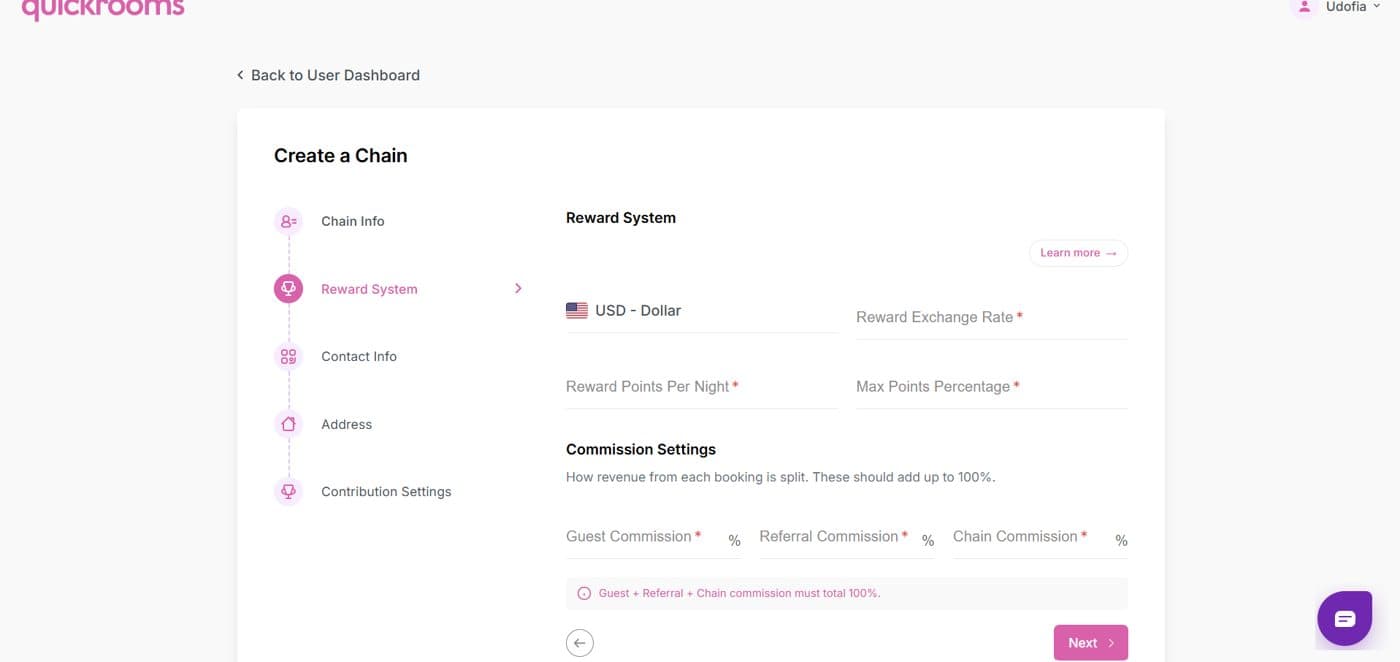
Create a Chain — Commission Settings
The Create a Chain form on the Hotel Dashboard, showing the reward system and the Guest, Referral and Chain commission settings that must total 100%

The exact split, the exchange rate, and how points are shared are all set by the chain owner and explained in simple steps in our help center.

Learn how it works

Guests being welcomed at a hotel reception

Loyalty your guests can feel

Give guests a warm reason to come back, and turn every hotel in your chain into part of one rewarding experience.

In the Guest App

One wallet, every hotel in the chain

Guests see their points grouped by hotel and apply them at booking in one tap. No codes, no vouchers, no front desk math.

Guests checking in at a hotel reception desk

On the Hotel Dashboard

Set up in minutes

Creating, joining and leaving a chain all live in the Hotel Dashboard.

Create a chain

Hotel Dashboard → Digital Chains → Create a Chain. Name the chain, set the reward system — currency, exchange rate, points per night and the maximum share of a booking payable with points — then set the Guest, Referral and Chain commissions, which must total 100%. Other hotels can then find it and apply to join.

Create a Chain form on the Hotel Dashboard showing reward system and commission settings

Join a chain

Leave a chain

Create a Chain form on the Hotel Dashboard showing reward system and commission settings

FAQ

Common questions

Everything hotels ask before starting or joining a chain. If yours is not here, we are happy to walk you through it.

Start your chain today

Create a Digital Chain, invite the hotels you trust, and turn every stay into the next booking.

Open the Hotel Dashboard