
In order to add TV channels on the Quickrooms TV app follow these few steps.
On the hotel dashboard, click on config and navigate to the Integrations tab
Click on IPTV and select TV Channel.
Click Create
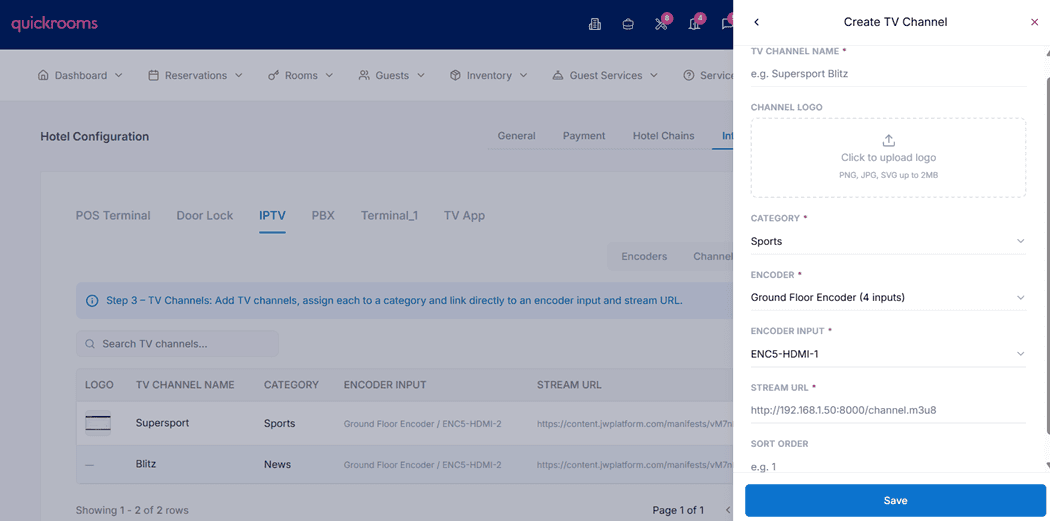
TV Channel Name: Enter the name of the TV channel (e.g. Supersport Blitz). This is what users will see on the TV.
Channel Logo: Upload the channel’s logo. Supported formats: PNG, JPG, SVG. This logo is displayed in the TV channel list.
Category: Select the category the channel belongs to (e.g. Sports, News, Movies). This helps organize channels properly on the TV interface.
Encoder: Choose the encoder that is generating the video stream. The encoder is the source that converts live video into a streamable format.
Encoder Input: After selecting an encoder, choose the specific input or channel source linked to that encoder.
Stream URL: Enter the streaming link (usually an .m3u8 URL). This is the actual video stream the TV will play.
Sort Order (Optional): Enter a number to control where the channel appears in the channel list. Lower numbers appear first.
Click Save to create and activate the TV channel.